



The AI Video Prompt Worked Once. Can Your Team Reproduce the Result?
A strong AI video prompt is only part of a repeatable production process. This guide shows teams how to separate fixed requirements from acceptable variation, record the inputs and settings behind an approved clip, run a three-pass handoff test, and review observable results instead of relying on vague impressions.

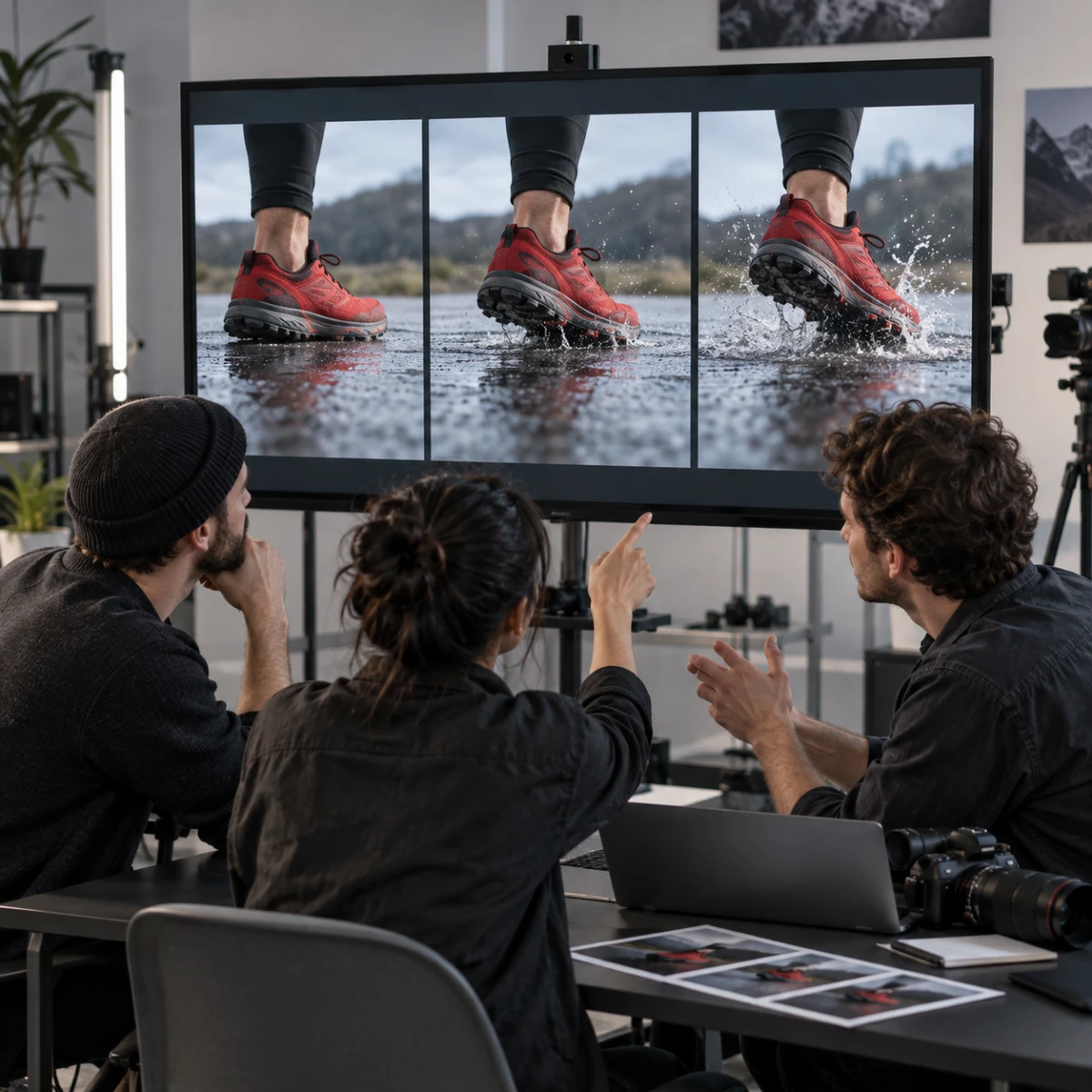


The first AI video looks right. The product stays recognizable, the camera moves at the right speed, and the final frame feels clean enough to show a client. Then a teammate copies the prompt and tries to make a second version. The camera changes direction, the lighting becomes flatter, and the product starts drifting before the shot ends.
If one good result cannot survive a handoff, the team does not yet have a repeatable workflow. It has a successful output and an incomplete record of how that output was made.
A Prompt Is Not the Whole Recipe
Imagine a team making a short launch clip for a red trail shoe. The useful version begins with the shoe on wet concrete, moves the camera slowly toward the sole, adds one small splash near the heel, and ends with the logo facing the viewer.
The prompt may describe all of that, but the result also depends on the starting image, its crop, the selected generation workflow, the clip length, the amount of motion, and any other controls used during the attempt. Even a slightly different source image can change the shoe’s apparent shape or give the camera a new path to follow.
The prompt records the instruction. It does not automatically record the full production state.
Separate What Must Stay Fixed From What May Change
Before generating more versions, divide the brief into two lists.
The fixed list might include:
- The same red shoe and visible logo
- The same low camera angle
- Wet concrete rather than a studio background
- A slow forward camera move
- No foot, hand, or extra product entering the shot
- The logo facing forward in the ending frame
The variable list might include the size of the splash, the exact position of reflected light, or the amount of empty space around the shoe.
This distinction matters because teams often describe every detail as equally important. When a later version changes, nobody knows whether the change is a harmless variation or a failed requirement. A short fixed list gives reviewers something objective to check.
Build a Small Generation Record
A reusable record does not need to become a long technical report. One page is usually enough. Save the following information with every approved draft:
- The exact prompt, including punctuation and paragraph order.
- The original source image or visual reference, with a stable file name.
- The selected workflow or generation mode.
- The chosen aspect ratio, duration, motion level, and audio setting, if used.
- Any negative instructions or exclusions.
- The date, output file name, and a thumbnail of the accepted result.
- A short note explaining why that version passed review.
If the system provides a seed or another repeatability control, record it. If it does not, do not pretend the output can be reconstructed pixel for pixel. The purpose of the record is to preserve the creative conditions and acceptance criteria, not to promise an identical render.
Test the Workflow in Three Passes
The fastest way to discover missing information is to run three deliberately different checks.
Pass one: rebuild the baseline. Use the approved inputs and settings again. Compare the first, middle, and final frames with the accepted version. The motion does not need to match every pixel, but the shoe, camera direction, pace, and ending composition should remain within the brief.
Pass two: change one allowed variable. Increase the splash slightly, for example, while keeping the product, crop, and camera path fixed. If several things change at once, the workflow is still under-specified.
Pass three: hand the record to another person. Give a teammate the saved assets and instructions without adding a verbal explanation. Their questions reveal what the record is missing. If they have to ask which source image was used or whether the camera should move, that information belongs in the written workflow.
Put the Tool Inside the Record, Not at the Center of the Brief
When creating a short draft in Vidu Q3, save the exact input image, prompt, selected workflow, duration and aspect ratio alongside the accepted output. Record only the controls actually used. The same principle applies to any generation tool: the team should be able to see which choices produced the draft instead of relying on somebody’s memory.
The product name alone is not a reproducibility method. The useful part is the relationship between the source material, the instructions, the chosen controls, and the review decision.
Review Observable Results, Not Vague Impressions
“It feels close” is difficult to hand off. Replace it with questions that can be answered from the clip:
- Is the shoe still the same shape in the middle frame?
- Does the camera continue moving toward the sole rather than orbiting the product?
- Does the logo remain readable at the end?
- Does the splash support the action without hiding the shoe?
- Does the clip end in a frame that can connect to the next shot?
These checks turn approval into a shared decision. They also make revisions smaller. Instead of rewriting the entire prompt, the team can identify whether the problem came from the source image, motion instruction, camera path, or ending state.
Reproducible Does Not Mean Identical
Generative video includes variation. A practical team standard should therefore focus on repeatable intent: the same subject, the same action, the same visual priorities, and an acceptable range of variation. Expecting an identical render can waste time; accepting any attractive result makes a campaign impossible to control.
The real test is simple: can another person use the saved record to produce a clip that passes the same checklist without needing the original creator beside them? If the answer is yes, the prompt has become part of a workflow rather than a one-time lucky result.
What is the detail your team most often forgets to record: the source asset, the motion settings, or the reason a particular version was approved?
Reward this post with your reaction or TipDrop:
 Like
0
Like
0
 Dislike
0
Dislike
0
 Love
0
Love
0
 Funny
0
Funny
0
 TipDrop
0
TipDrop
0
 Sad
0
Sad
0
 Angry
0
Angry
0
















Comments (0)